Workout Tracker App That Works Offline at the Gym

A workout tracker works offline when it saves each set on your phone first and uploads it later. Musklr does that: starting a workout, logging sets, the rest timer, exercise search, your history and the charts run from a database on your iPhone, with no account needed. With Pro and an account, it backs up once you are online.
What does a workout tracker need to work offline at the gym?
The tracker has to save each set on the phone the moment you log it, so nothing waits for a server. The exercise list has to live on the phone as well, or search fails in a basement with no signal. The upload to a backup then happens later, once the phone is online again, without you having to remember it.
Some parts of any app need a server however it is built: a feed, other people's profiles and their comments live there, and so does your backup until the phone reaches it.
What works offline in Musklr?
Musklr keeps your workouts, programs and history in a database on your iPhone and writes each set to it the moment you tick it. Almost everything you do during a workout runs from there.
| Feature | Works offline | How |
|---|---|---|
| Starting a workout and logging sets | Yes | Each set is saved on the iPhone when you tick it |
| Rest timer and the Lock Screen Live Activity | Yes | Both run on the phone |
| Apple Watch app | Yes, with the iPhone nearby | Sends each set straight to the iPhone |
| Exercise search | Yes | All 2,000+ exercises ship with the app |
| Exercise animations | After the first view | Downloaded once, then kept on the phone |
| History, charts and muscle heat map | Yes | Read from the database on the phone |
| Creating and editing programs | Yes | Saved on the phone |
| Backup to your account | Once you are online | Needs Pro and an account, then runs by itself |
| Explore, feed, profiles, likes and comments | No | Other people's content is on the server |
| Sign-in, restoring a backup and purchases | No | Each needs the server or the App Store |
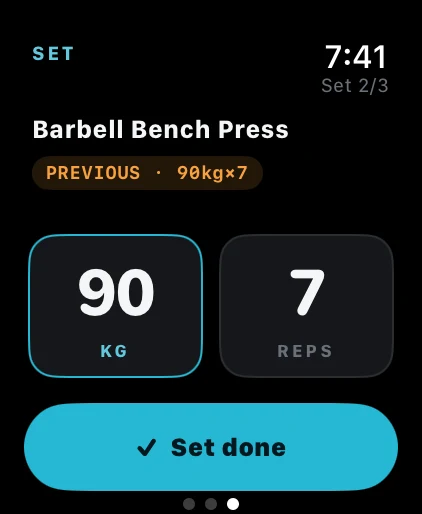
The Apple Watch app sends each set to your iPhone over the direct link Apple keeps between a Watch and its phone, so it needs no internet connection. Keep the iPhone in a bag or a pocket nearby and the Watch logs as usual at a gym with no signal.
Exercise animations are the one part that has to download first. Musklr fetches an exercise's animation the first time it is shown and keeps it on the phone, in a cache of 200 MB by default. For how Musklr compares with other iPhone trackers on offline logging, the Watch and price, see the best iOS weight lifting app for iPhone and Apple Watch and the best workout tracker apps in 2026.
What happens to a workout logged offline when the signal comes back?
With Pro and an account, Musklr uploads what changed without you pressing anything: when the connection returns, when you open the app, and when you finish a workout. While the phone is offline it skips the upload and keeps the changes marked for the next try, and an upload cut off halfway is sent again next time.
Without Pro or without an account, everything stays on the iPhone and the app works the same way. Sign in later and the workouts you already logged move into your account, and with Pro they upload with the next sync. On a new iPhone, sign in and tap Restore from backup under Data & Storage in Settings to bring back your workouts, programs and history. That step needs a connection.
How do you log a workout in airplane mode and back it up later?
- While you still have signal, open the workout you plan to do, so Musklr downloads its exercise animations and keeps them on the phone.
- Start the workout and tick each set as you finish it. Each set is saved on the iPhone right away.
- Use the rest timer, the Lock Screen and the Apple Watch as usual. None of them needs the internet.
- Finish the workout. Your history, charts and muscle heat map update on the phone.
- Back online, open Musklr. With Pro and an account, the workout uploads to your account by itself.
Does keeping a workout log help you reach your training goals?
A 2016 meta-analysis by Benjamin Harkin and colleagues pooled 138 studies with 19,951 participants, each of which randomly assigned people either to an intervention that helped them monitor their progress toward a goal or to a control group. The interventions made people check their progress more often and helped them reach their goals. The effect was larger when the progress was physically recorded, and when it was reported to others or made public. The studies covered many kinds of goals, so they say nothing about training logs in particular.
Get Musklr free on the App Store
Frequently asked questions
Does Musklr need an internet connection to log workouts?
No. Musklr saves every set to a database on your iPhone the moment you tick it, and the rest timer, exercise search, history and charts run from the phone too. You need a connection for the social features, for sign-in and purchases, and to back up to your account.
Can you use Musklr without an account?
Yes. Logging, programs, history and charts all work without signing in, and the data stays on your iPhone. An account adds the social features, and Musklr Pro adds cloud sync and backup. If you sign in later, the workouts you already logged move into your account, and with Pro they upload.
Do Musklr's exercise animations work without internet?
Once you have seen them, yes. Musklr downloads an exercise's animation the first time it is shown and keeps it on the phone, in a cache of 200 MB by default that you can change in the app's storage settings. An animation you have never opened needs a connection the first time.
Does the Musklr Apple Watch app work without an internet connection?
Yes, as long as your iPhone is nearby. The Watch app sends each set straight to the iPhone over the direct link between the two devices, and the iPhone saves it. You need no mobile data and no gym Wi-Fi to log a workout on the Watch.
Is offline workout logging free in Musklr?
Yes. Logging works offline on the free tier, with no limit on how many workouts you log. The free tier allows one program with two saved workouts and ten exercises per workout, and Pro removes those limits. Working offline does not need Pro. Cloud sync and backup to your account are part of Pro.
Sources
- Harkin B, Webb TL, Chang BP, et al. (2016). Psychol Bull 142(2):198-229. Does monitoring goal progress promote goal attainment? A meta-analysis of the experimental evidence
This article is general information about training and is not medical advice.
Log your next workout in Musklr
Musklr is free on the App Store and has no ads. Log a set in two taps on iPhone or Apple Watch.
